> ## Documentation Index
> Fetch the complete documentation index at: https://docs.neterial.cloud/llms.txt
> Use this file to discover all available pages before exploring further.
# Connect Hetzner Cloud
> This guide will help you to connect your Hetzner Cloud account to Neterial
## Generating an API token
To generate an API token on your [Cloud Console](https://console.hetzner.cloud/), please open your project and do the following:
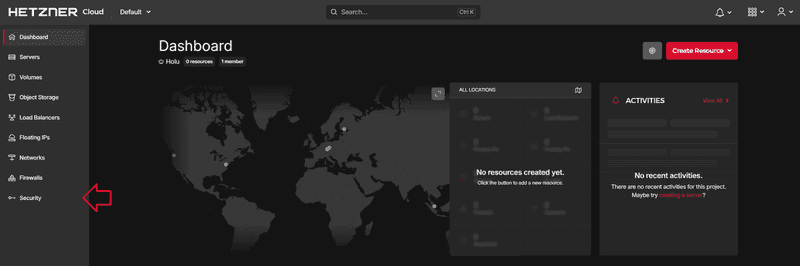
1. Go to **Security** on the left menu bar
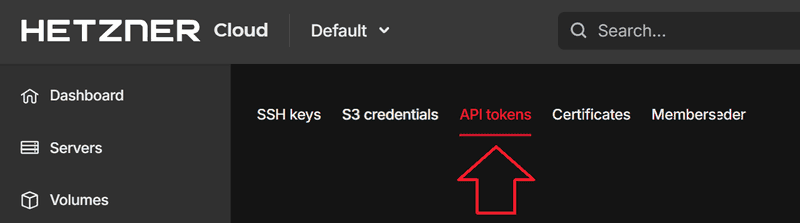
 2. Go to **API tokens** on the upper menu bar
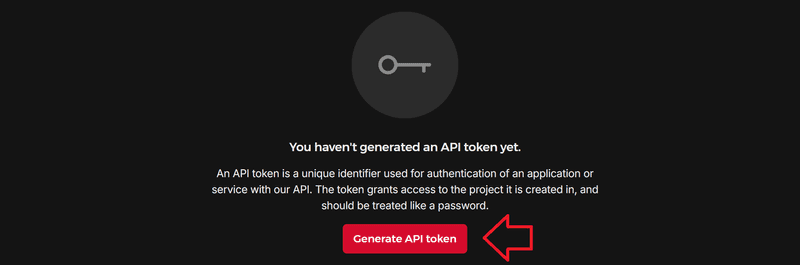
 3. Select **Generate API token**
 4. Create your API token
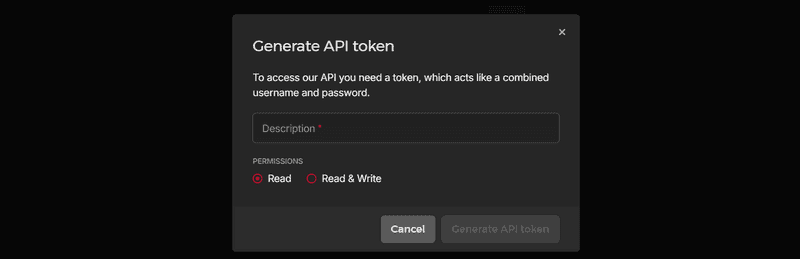 * Enter a description in the upper text box.
* Choose a permission. You can choose between **Read** and **Read & Write**.
If you select **Read**, the token will only be allowed to perform GET requests.
If you select **Read & Write**, the token will be allowed to perform GET, DELETE, PUT and POST requests.
5. Copy your API token
* Enter a description in the upper text box.
* Choose a permission. You can choose between **Read** and **Read & Write**.
If you select **Read**, the token will only be allowed to perform GET requests.
If you select **Read & Write**, the token will be allowed to perform GET, DELETE, PUT and POST requests.
5. Copy your API token
 You now have an API token. Note that it is not possible to view the token again once the window has been closed.
**Please note:** Your secret API token has to be included in **every request** you send to the API.
Example [curl](https://curl.se/):
```
curl \
-H "Authorization: Bearer $API_TOKEN" \
...
```
You now have an API token. Note that it is not possible to view the token again once the window has been closed.
**Please note:** Your secret API token has to be included in **every request** you send to the API.
Example [curl](https://curl.se/):
```
curl \
-H "Authorization: Bearer $API_TOKEN" \
...
```